U & the new K&H mobile bank
& your bank is in your pocket
- fresh and new design
- discreet mode and easier navigation
- Kate is now smarter than ever before
- download & explore it


try out the new features
- upload your profile pic
- hide your account balance with the new discreet mode
- repay your credit card whenever and wherever you want
- you can see your K&H+ purchase history
- the earlier „mobile-token authentication” and „mobile-token signature” functions become one under the new „K&H e-bank code reading” button
the new K&H mobile bank
-
dashboard
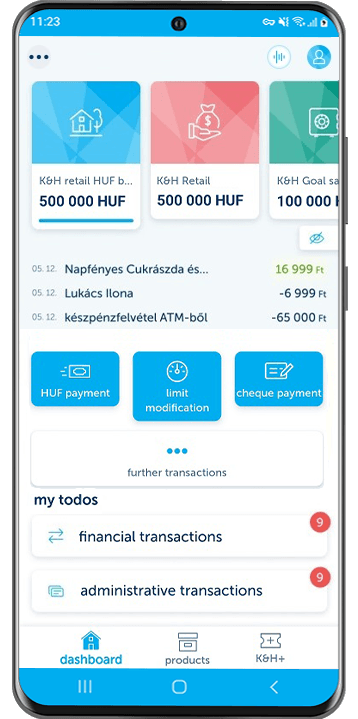
All the essential information can be found in the new K&H mobilbank’s dashboard. You can check your balance, see your last three transactions and initiate new ones with the quick launch buttons. In case of more accounts you can swipe between them and with the help of discreet mode you can hide your sensitive account information when someone might be looking over your shoulder.
Don’t worry if you couldn’t finish something for the first time, as we remind you about it in the todos section! -
products
The next important step is to check the products screen. This contains two main sections, in the top of the screen you can find your own products e.g. your cards, your loans etc.
Beneath that you can browse all the available products we offer you. Thus you can easily apply for a personal loan or start your regular investment. -
K&H+
The last main section of the new K&H mobilbank is the K&H+ screen. Here you can check your purchased tickets or passes, all of which can be validated easily when you need them. Of course you can always buy new ones and look at your purchase history.
-
account screen
When you tap on your account in the dashboard you will see the account screen. Here you not only see your account balance, but you can also see the bank cards linked to the account and also your transaction history. To help you find your way around, we display every transaction category with different colours and icons and you can also search between them.
-
account details
By tapping the gear icon on your account screen you can find out many more information about it. Here you can see your credit limit (if you have any), you can manage your secondary identifiers and can easily share your account number with anyone.
-
bank cards
You can reach your bank cards by two ways:
1. On your account screen you can always find those cards which are linked to the account.
2. By tapping my cards in the products screen you can see every card you own and manage.
Don’t forget, you can always digitize your cards from the K&H mobilbank, check your PIN-code, modify your limits or suspend your card. -
profile
In the top right corner you can find your profile icon. This the place to manage your partners, read your inbox or switch between your users. For more convenience don’t forget to upload different profile pictures to your users!
-
showing loans
Here you can now find all the important information about your home loans, your babyboom loan and your personal loans. Among others, how much your loan dept, when your loan expires, when you have to pay the next installment, and exactly how much is it.
-
savings overview
By tapping on my deposits, you will find the most important information about them: what is the amount, when it expires and to which account. You can switch between account and currency view to evaluate your portfolio more easily.
-
investments overview
By tapping on my investments, you can see exactly how much your securities are worth. You can switch between account and currency view to evaluate your portfolio more easily.
-
ATM & branch locator
In this function, we offer you a number of settings and filters to help you find the K&H ATM or branch nearest to you. You can search for the nearest branch open at this point in time, having accessible facilities or providing premium banking services.
-
mobile top-up
You can top up your pre-paid mobile phone cards with the providers Telekom, Yettel or One. Access the function either from the dashboard by tapping on further transactions or from the K&H+ screen. You can select the phone number to be topped up from the contacts list of your own phone or from the list of partners in the mobilbank application. There will be fixed top-up amounts to choose from and you can pay with your credit card too.
details
- our clients using the K&H e-bank service have automatic access to the K&H mobilbank services that require identification
- to use the application, you first need to sign a contract for Banking Services requiring Electronic Identification with us
- The new K&H mobilbank requires strong biometric authentication. This means there may be Android devices where you will only be able to login by using fingerprints.
You can use the application on the following devices:
- iPhone 6S and later iPhone devices with at least iOS 16 operating system;
- Android smartphones with at least Android 10 operating system;
- K&H mobilbank application is unavailable on those Huawei devices, which does not support Google Play Services (GPS) (e.g. Huawei Mate 30, P40 etc.)
will need to have access to the internet to transact in your personal finances. You can, however, access the mobile-token auhentication even offline.
The authorisations over your business accounts will be the same as the authorisations set up in K&H e-bank.
You can download the K&H mobilbank application on a number of mobile devices and use it on all of them once you have activated your mobile token.
Deactivate the application by cancelling the mobile token in the “application-settings” menu. Once deactivated, functions requiring a login will not be available to you. If you have lost your phone or if it has been stolen, you can cancel the mobile token immediately in the “settings/manage identification devices” menu in K&H e-bank or by contacting the K&H TeleCenter.
The daily limit for payment orders submitted via K&H mobilbank has been increased to HUF 20 million from 1 September 2023.
Orders submitted via K&H mobilbank are subject to the same charges as the transactions entered in K&H e-bank.
K&H mobilbank’s Privacy Policy is available here:
https://www.kh.hu/web/eng/data-protection/specific-information/mobilebank
how to apply
Clients who use the K&H e-bank service can automatically start to use K&H mobilbank after downloading and activating it, without any separate application. If you have not signed up for K&H e-bank yet, you will need to sign a contract for Banking Services requiring Electronic Identification with us.
activation
After downloading K&H mobilbank, you will need to activate it in a few simple steps. You can choose from one of three options for activation:
activation with user name and password
Choose this option if you have already used K&H mobilbank or currently use K&H e-bank with your user name and password. You can activate K&H mobilbank with the same user name/password combination as used in the e-bank.
activation with K&H myID and ePIN
As a new user who has not used K&H e-bank yet, you can use your K&H myID and ePIN code for activation. If you do not know or have forgotten your IDs, visit any one of our branches to apply for a new one.
activation in K&H e-bank
You can also activate the application in K&H e-bank. Log in to your e-bank on your computer and click on the settings/mobile token activation menu item, where we will lead you through each step of the process.
During activation, you will need to choose a security identifier called the mPIN code, which you will use for logging in to mobilbank and confirming transaction signatures there. If you have a suitable iPhone device, you can use the Touch ID instead of the mPIN code.
e-banking with mobilbank
The mobile token incorporated in K&H mobilbank gives you a high level of security and simple and fast access to log in to your e-bank account and sign transactions there without the need for a keyboard.
logging in to K&H e-bank
In order to log in to the e-bank (and sign transactions there), you do not need to log in to K&H mobilbank: all you need to do is tap on the “K&H e-bank code reading” button in the login screen, then scan the coloured code with your smartphone. If your mobile phone is connected to the internet, the e-bank login will then take place automatically. If your mobile is offline at this point, then a series of numbers will be displayed in the mobilbank application and you will need to type them in the e-bank screen on your computer.
signing transactions in K&H e-bank
You can confirm transactions entered in e-bank by using your mobilbank application. You do not need to log in to K&H mobilbank to sign the transactions submitted in e-bank: all you need to do is tap on the “K&H e-bank code reading” button in the login screen, then scan the coloured code with your smartphone.
adapted to your needs
-
convenient and practical since you always have your mobile phone with you
-
you can set your daily bank card transaction limit just before making a purchase or picking up cash, you do not need to wait till you get to a computer next
-
access the latest up-to-date information about your account and card anywhere, any time
-
compact, easy to handle, less data used than with a browser
-
high level of security yet simple and easy to use
who is is recommended for?
-
those who try to manage their day-to-day finances quickly so that they can spend their time doing what they care about most
-
those for whom mobility is important and wish to be able to check the transactions on their bank accounts or bank cards at any time
-
those who wish to combine the convenience of internet banking with the practicality of a mobile phone
find out everything about secure mobile banking!
the security of K&H mobilbank also depends on the overall security status of your mobile phone:
-
do not remove built-in protection from the phone (do not have your device rooted or jailbroken)!
-
do not install any mobile application from unverified sources. Use only the official on-line stores! If you no longer need an application, delete it from your device!
-
whenever installing a mobile application, check the authorisations that the software is requesting! If it demands authorisations that are not appropriate to its purpose (e.g. if a notepad app requests the authorisation to send you text messages), then do not install the application!
-
use a PIN code or password on your phone for extra protection against unauthorised persons should you leave the phone lying around or lose it!
remember the following when you install and use K&H mobilbank:
-
download the K&H mobilbank application only from the AppStore or Google Play. K&H Bank does not make its K&H mobilbank available anywhere else.
-
Do not write down your mPIN code and do not share it with anyone!
we do everything we can to make sure that K&H mobilbank is secure. A few important safety measures:
-
the mobile token is a high-security two-factor identification method. If a phone is stolen, the application cannot be used in the absence of the mPIN code, and vice versa: the mPIN code is only useful if you have the phone in your possession.
-
application-to-bank communication is encrypted so that unauthorised persons cannot access it and cannot change the data forwarded via the network
-
if you lose possession of your phone, you can block it in K&H e-bank or by phoning K&H TeleCenter / K&H Cégvonal
what is the K&H myID and the e-PIN code? Where can I find them if I have forgotten them? What can I do if I need to change or replace them?
The K&H myID is your unique ID for accessing electronic services.
You will need it when you use K&H e-bank or K&H mobilbank and, for certain transactions, the K&H TeleCenter. You will receive your K&H myID and the associated e-PIN code in our branch when you sign your contract for electronic services.
No matter which services you plan to use, you will need only one K&H myID. If you wish to add a new electronic service to one you already use, you will need your K&H myID to do so, which is why we recommend that you always have it at hand when you transact with the bank.
You will find your K&H myID in your account statement, both the printed one and the version you can download from the e-bank. A K&H myID and the e-PIN code may only be replaced in our branches. If you need to do so, please visit any of our branches to request a new one free of charge.
what is a mobile token?
The mobile token is a software solution for identification, incorporated into our K&H mobilbank. When you activate K&H mobilbank, we will register the mobile token with your mobile phone so that you can access the mobilbank application only from the phone where you activated it. You can of course download the application to several phones but you will need to activate each of them.
In the activation process you will be asked to select a security identifier called the mPIN code, which you will then use to log in to mobilbank and to confirm transaction signatures. If you have an iPhone, you can use your Touch ID instead of the mPIN code.
The mobile token is not simply a mobile banking identification device but also a means for you to log in to your e-bank account and sign orders simply and fast, without the need for a keyboard and at a high level of security.
I am an existing K&H mobilbank user – what changes should I expect?
If applications on your phone are not updated automatically, you must update your K&H mobilbank app and then activate it when you first log in. This is because, thanks to the new mobile token identification in the upgraded K&H mobilbank, the functions required for daily banking now benefit from a higher level of security. When you activate the app, we link your mobile phone to the mobile token to ensure that the app can only be used from that mobile phone. The mobilbank app can be installed on multiple devices but it must be activated on each one individually.
functions modified according to client needs:
- you can make payments in forint to any bank account without having to register them as partners in the e-bank
- you can save any bank accounts you entered as partners, complete with phone numbers. The details of your partners entered in the e-bank are also visible in the mobilbank
- the daily limit for payment orders submitted via K&H mobilbank is HUF 10 million
- payment orders entered in the K&H e-bank can also be signed in our mobilbank and vice versa
- you can track payment orders in ‘pending’, ‘completed’ or ‘failed’ status entered in the e-bank or the mobilbank
- you can modify your online (virtual) purchase limit
- the ATM and branch search function has been upgraded
Payments in foreign currency cannot be made in the new app.
The use of mobilbank no longer has to be authorised in the e-bank. Your relevant contract, K&H me ID and ePIN code will automatically enable you to access the app.
what is the mPIN code?
The mPIN code is your unique identifier for logging in to mobilbank and signing off transactions there. The mPIN code is a numerical sequence of 5 to 12 characters, which you can select when you activate the mobilbank application. You can change your mPIN code in the “settings” menu in the application at any time and, if you have an iPhone, you can also use your TouchID instead of the mPIN.